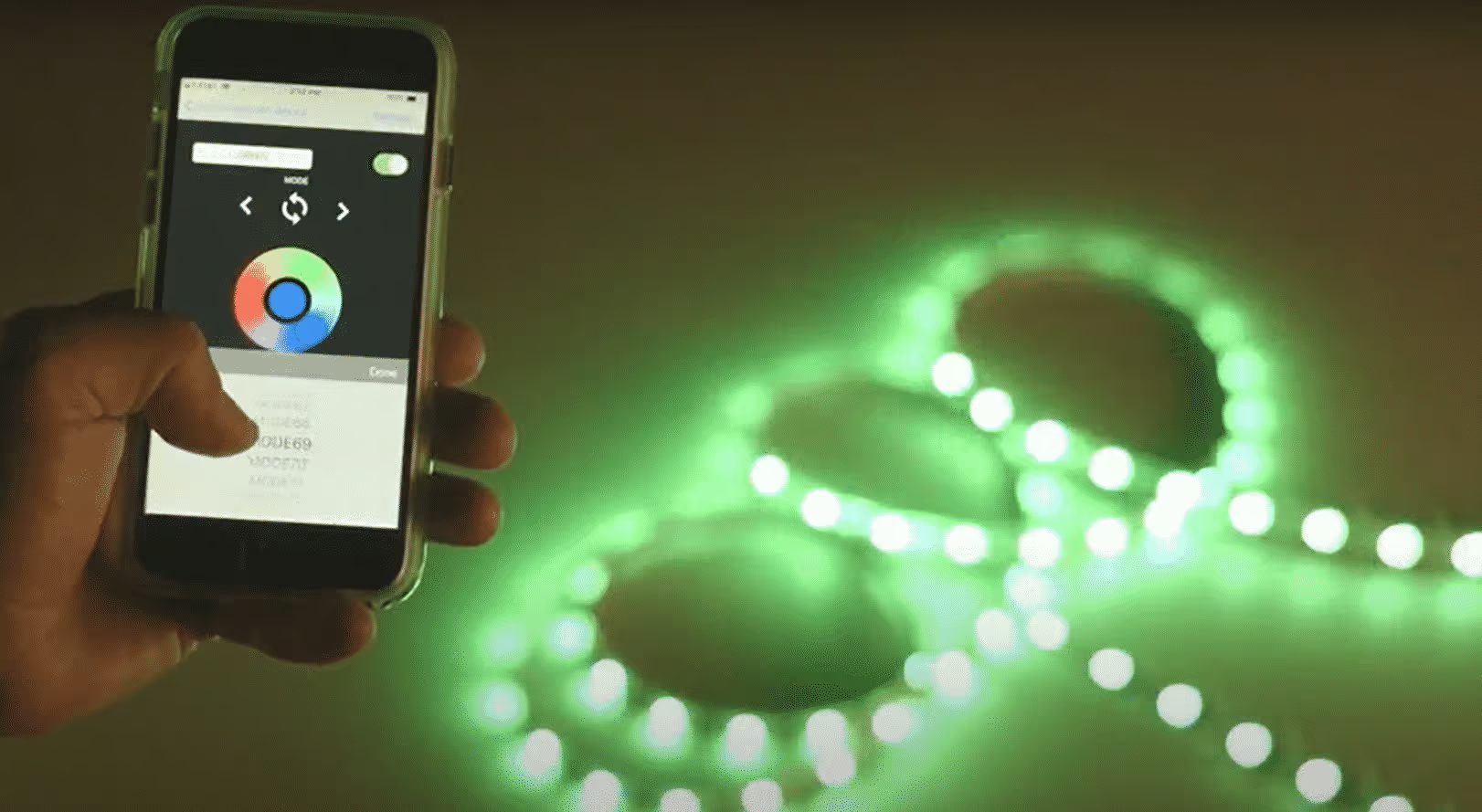
Xav tau lub teeb ci ntse tswj qhov system rau koj qhov chaw? Sim txuas LED sawb teeb rau koj lub xov tooj thiab tswj koj lub tsev ambiance los ntawm txhua qhov chaw ntawm lub ntiaj teb!
Koj tuaj yeem txuas LED strips rau koj lub xov tooj siv Bluetooth lossis Wi-Fi. Muaj ntau cov ntse LED sawb teeb muaj nyob rau hauv kev ua lag luam uas muaj cov xov tooj sib xyaw ua ke. Cov khoom siv no feem ntau txuas rau koj lub xov tooj Bluetooth lossis Wi-nkaus network kom muab kev xaiv tswj hwm rau koj. Koj tuaj yeem tswj hwm qhov teeb tsa ntawm koj lub tsev ncaj qha los ntawm cov cuab yeej hauv koj txhais tes, smartphone, ntawm cov apps!
Hauv tsab xov xwm no, kuv yuav muab koj cov lus qhia dav dav ntawm kev txuas LED sawb teeb rau cov xov tooj. Mus los ntawm kev sib tham thiab xaiv txoj kev uas haum rau koj lub teeb pom kev zoo tshaj plaws-
Qhov zoo ntawm Kev Txuas LED Sawb Teeb Rau Xov Tooj
Txuas LED strips rau koj lub xov tooj ua rau lub teeb-tswj system hloov tau yooj yim. Nov yog qee qhov txiaj ntsig uas koj yuav tau txais los ntawm qhov no-
- Tswj kom zoo dua ntawm Brightness
Txuas LED strips rau cov xov tooj muab kev tswj hwm koj lub teeb pom kev zoo. Koj tuaj yeem kho qhov ci lossis dim lub teeb tsuas yog kov koj lub vijtsam mobile. Kev yuav khoom a tunable LED sawb tuaj yeem nqa cov txiaj ntsig zoo hauv qhov no. Koj tuaj yeem tsim lub suab sov kom txias los ntawm koj lub xov tooj. Yog xav paub ntxiv- kos qhov no- Tunable Dawb LED Sawb: Daim Ntawv Qhia Ua tiav.
- Lub teeb xim Customization
Smartphone-integrated LED sawb teeb coj lub teeb xim customization mus rau qib tom ntej. Koj tuaj yeem tsim koj lub teeb xim uas koj xav tau los ntawm koj lub vijtsam mobile. Piv txwv li, kev sib txuas RGB LED sawb teeb rau koj lub smartphone tuaj yeem tsim txog 16 lab hues. Yog li, hloov koj chav xim raws li koj lub siab xav!
- Teem caij Lub Teeb
Koj tuaj yeem tswj cov LED strips siv lub xov tooj smartphone app nrog lub sijhawm teem sijhawm. Ntawd yog, koj tuaj yeem teeb lub sijhawm rau koj lub teeb. Yog li, lawv yuav qhib thiab kaw cia li ua raws li lub sijhawm teem ua ntej. Yog li, koj yuav tsum tsis txhob txhawj txog kev siv ntau dhau; nws txuag nqi hluav taws xob.
- suab Control
Ntau lub LED strips tau sib xws nrog lub suab pab xws li Alexa, Google Assistant, lossis Apple HomeKit. Yog li, koj tuaj yeem siv cov lus txib hauv xov tooj los tswj lub teeb pom kev zoo. Qhov no ua rau koj muaj tes-dawb lub teeb-tswj system.
- Kab ntsab
Koj yuav tsum tsis txhob tawm ntawm koj lub txaj lossis lub rooj zaum comfy kom tua lub teeb ntxiv lawm. Txuas lub LED sawb teeb rau koj lub smartphone cia koj hloov nws ntawm koj lub txaj. Dhau li muaj kev nkag tau Wi-Fi, koj tuaj yeem tswj koj lub tsev teeb pom kev zoo los ntawm txhua qhov chaw thoob ntiaj teb. Qhov no ua rau tag nrho cov txheej txheem tej yam yees siv!
Txoj hauv kev txuas LED Sawb Teeb rau Smartphone
Koj tuaj yeem txuas LED sawb teeb rau lub smartphone ntawm Bluetooth lossis Wi-nkaus. Tab sis tsis yog txhua qhov LED strips txhawb kev sib txuas ntawm smartphone. Tias yog vim li cas koj yuav tsum tau txais lub ntse LED sawb uas txuas thiab tso cai rau kev tswj hwm app.
Bluetooth Kev Txuas Lus
Koj paub zoo txog kev txuas lub mloog pob ntseg lossis sib koom cov duab suab paj nruag siv koj lub smartphone Bluetooth. Tab sis koj puas paub tias LED strips tuaj yeem txuas nrog Bluetooth? Txuas Bluetooth-enabled LED strips, koj tuaj yeem tswj lub teeb pom kev zoo nrog koj lub xov tooj. Koj tuaj yeem tswj Bluetooth LED strips los ntawm qhov deb mus txog 30 ko taw lossis 10 meters.
Yuav ua li cas txuas LED Teeb rau Smartphones ntawm Bluetooth?
Txhua lub xov tooj smartphone los nrog Bluetooth txuas kev xaiv. Koj tuaj yeem siv qhov tshwj xeeb no los tswj koj lub sawb LED siv koj lub xov tooj. Ntawm no yog qhov txheej txheem-
- Yuav Bluetooth-enabled LED Sawb Teeb
Ua ntej, koj yuav tsum tau txais ib tug haum LED sawb sib xws nrog Bluetooth. Xav txog qhov zoo ntawm lub fixture thiab ib txwm yuav los ntawm lub npe nrov npe.
- Qhib Lub Teeb
Nruab lub LED sawb rau koj qhov chaw xav tau. Koj tuaj yeem siv phau ntawv qhia no pab kawm ntau hom LED sawb mounting cov tswv yim- Txhim kho LED Flex Strips: Mounting Techniques. Txuas lub sawb mus rau lub hwj huam mov thiab qhib nws. Ua qhov no manually los xyuas tag nrho cov kev sib txuas ntawm qhov taw tes. Yog tias lub teeb tsis ci, nrhiav cov teeb meem hauv kev teeb tsa.
- Nruab lub App ntawm koj lub cuab yeej ntse
Txhua Bluetooth-enabled LED sawb muaj ib qho app txuas koj lub fixture rau koj lub xov tooj ntawm tes. Koj yuav pom cov ntaub ntawv app no nyob rau hauv lub thawv ntim lossis cov neeg siv phau ntawv. Feem ntau, feem ntau LED strip ntim tuaj nrog QR code; koj tuaj yeem luam theej duab sai sai thiab nruab lub app. Txawm li cas los xij, muaj cov apps sib txawv rau Android thiab iPhone; kuaj qhov ntawd thiab.
- Pair cov Devices
Thaum koj tau rub tawm daim ntawv thov, nws yuav tshwm sim ntawm koj lub vijtsam mobile. Qhib lub app thiab muab cov ntaub ntawv xav tau. Tam sim no tig koj lub xov tooj Bluetooth thiab txuas nws mus rau LED sawb. Yog tias koj tsis pom LED strip lub npe ntawm daim ntawv txuas Bluetooth, rov ua dua thiab rov sim dua.
- Tshawb xyuas Cov Kev Xaiv Tswj & Siv Nws
Mus rau lub teeb tswj vaj huam sib luag tom qab txuas lub LED sawb nrog Bluetooth. Txheeb xyuas cov yam ntxwv thiab sim hloov xim, dimming, hloov rau thiab tawm. Yog li, koj tuaj yeem tswj koj lub LED sawb nrog koj lub smartphone.
Wi-nkaus Kev Txuas Lus
Wi-Fi Kev sib txuas yog cov thev naus laus zis tshaj plaws los txuas LED strips rau koj lub smartphone. Tam sim no, feem ntau lub tsev, chaw ua haujlwm, lossis chaw lag luam muaj Wi-Fi chaw. Yog li, txuas Wi-Fi rau koj lub LED sawb yog ib qho kev txav mus los yog tias koj xav ua kom koj qhov chaw ntse thiab thev naus laus zis. Nws pab koj tswj koj qhov chaw teeb pom kev zoo los ntawm txhua qhov chaw nrog kev sib txuas hauv internet.
Yuav ua li cas txuas LED Teeb rau Smartphones ntawm Wi-Fi?
Ua ntej, koj yuav tsum yuav Wi-Fi-enabled LED sawb teeb los tswj nws nrog koj lub smartphone. Koj tuaj yeem yuav qhov no los ntawm txhua lub khw hauv zos lossis xaj nws hauv online. Tab sis xyuas kom cov strips zoo zoo. Txawm li cas los xij, koj tuaj yeem txuas qhov no ntawm EZ hom thiab AP hom. Cov txheej txheem txuas rau ob qho kev xaiv yog raws li hauv qab no-
1. EZ hom Wi-nkaus txuas rau LED Sawb
EZ hom yog ib qho yooj yim Wi-Fi teeb rau txuas nws mus rau ib tug LED sawb. Lub configuration yog yooj yim. Koj tsis tas yuav muaj kev paub txuj ci rau qhov no. Cov txheej txheem ntawm kev sib txuas ntawm LED sawb nrog Wi-nkaus ntawm EZ hom yog raws li hauv qab no-
- Download tau cov Apps tsim nyog
LED sawb koj yuav qhia cov apps tshwj xeeb los txuas lub fixture rau koj lub xov tooj ntawm tes. Koj yuav pom QR ntawm lub app ntawm lub ntim. Luam theej duab nws lossis manually mus rau Google Play Store (Android) lossis Apple Store (rau iPhone) thiab tshawb rau lub app. Download tau nws rau koj lub xov tooj.
- Teeb lub LED Sawb
Tig lub LED sawb teeb thiab tos 10 vib nas this. Tam sim no, nias lub hwj chim khawm ntawm tus maub los / chaw taws teeb thiab tuav nws rau 3 vib nas this. Qhov no yuav ua rau lub teeb nyem ob zaug txhua ob. Yog tias koj pom qhov xwm txheej zoo li no, nws qhia tias lub teeb tso cai rau kev sib txuas ntawm Wi-Fi.
- Txuas lub App
Mus rau lub downloaded app thiab nkag mus rau nws. Tej zaum koj yuav tsum tau muab qee cov ntaub ntawv xws li email, password, lossis username los qhib tus ID. Thaum koj nkag mus rau hauv lub app, nrhiav qhov zoo (+) cov cim. Hauv feem ntau ntawm cov ntawv thov, koj yuav pom lawv nyob rau sab xis saum toj kawg nkaus. Nyem rau ntawm qhov kos npe los txuas lub LED sawb rau koj lub network Wi-nkaus. Txhawm rau nkag mus rau kev sib txuas, nws yuav xav tau tus username thiab password. Thaum koj nkag mus rau tag nrho cov ntaub ntawv, Wi-Fi kev sib txuas lus pom zoo kos npe yuav tshwm sim.
- Tswj Koj Lub Teeb Teeb
Thaum Wi-Fi txuas nrog, mus rau lub app tswj vaj huam sib luag. Los ntawm no, koj tuaj yeem kho lub teeb ci, lub suab, thiab xim. Yog tias koj siv RGB LED sawb, nws tuaj yeem coj koj txog 16 lab kev hloov kho hues!
2. Access Point (AP) Hom Wi-Fi Kev Txuas Rau LED Sawb
Txawm hais tias EZ hom yog txoj hauv kev yooj yim tshaj plaws los txuas koj lub LED sawb rau lub smartphone ntawm Wi-Fi, ntau tus neeg siv khoom yws tias EZ tsis ua haujlwm rau lawv. Hauv qhov xwm txheej zoo li no, kev siv AP hom yog koj qhov kev daws teeb meem kawg. AP stands rau Access Point Mode. Nws tso cai rau kev sib txuas yooj yim ntawm ntau yam khoom siv. Yog tias koj tau txais 'kev sib txuas tsis ua haujlwm' ceeb toom sim EZ hom, ua raws cov txheej txheem hauv qab no txhawm rau txuas LED sawb nrog AP hom-
- Qhib AP hom
Mus rau koj daim ntawv thov downloaded thiab nyem rau ntawm Ntxiv Devices. Nyob rau sab saum toj ntawm lub vijtsam, koj yuav pom AP hom khawm; nyem rau ntawm nws. Qhov no yuav qhib AP hom.
- Txuas Smartphone rau LED Teeb 'Network
Tam sim no, rov ua cov txheej txheem tib yam li koj tau ua rau EZ hom. Ntawd yog, nias lub hwj chim khawm ntawm cov chaw taws teeb hauv kab rau 3 vib nas this. Yog hais tias lub teeb flashes, nyem qhov Confirm light blink maj mam khawm ntawm lub app. Qhov no yuav coj koj mus rau qhov kev sib txuas ntawm Wi-nkaus. Sau koj Wi-Fi username thiab password thiab nias kom paub meej. Qhov no yuav txuas daim ntawv thov mus rau lub teeb lub Wi-Fi. Cov txheej txheem no yuav siv sij hawm me ntsis, tab sis koj yuav pom qhov kev nce qib ntawm koj lub vijtsam mobile. Txawm li cas los xij, yog tias koj pom cov ntawv ceeb toom zoo li- 'tsis muaj internet', koj yuav tsum paub meej tias koj lub hom phiaj txuas mus rau Wi-nkaus network no. Hauv qhov no, kuv xav kom koj txuas lub LED sawb ua ntej rau koj lub tsev Wi-nkaus. Thaum nws txuas nrog, koj yuav tau txais kev ceeb toom zoo li- Cov cuab yeej txuas tau tiav.
- Nkag mus thiab Tswj LED Teeb Nrog Smartphone
Tam sim no koj tuaj yeem tswj lub teeb teeb ntawm koj lub tsev tag nrho los ntawm koj lub xov tooj ntawm tes. Kuj tseem muaj lub teeb lub npe kho kev xaiv hauv feem ntau ntawm cov apps. Yog li, koj tuaj yeem hu lub teeb pom kev ntawm chav sib txawv thiab tswj lawv los ntawm txhua qhov chaw nrog Wi-nkaus txuas.
Txuas LED Cov Lus Qhia rau Smartphones- Lub Rooj Sib Tham
| Txuas LED Sawb Nrog Smartphone: Bluetooth Vs. Wi-nkaus | ||
| Txheem | Bluetooth | Wi-Fi |
| ntau | 30 ko taw (10 meters) los yog tsawg dua | Tsis txwv; tsuav yog koj muaj internet txuas |
| Teeb meem nyuaj | Yooj yim heev | Kev teeb tsa muaj ob hom-EZ thiab AP hom. AP hom yog qhov nyuaj me ntsis los teeb tsa piv rau EZ hom. |
| tej thaj chaw deb tswj | Txwv rau Bluetooth ntau yam | Kev tswj chaw taws teeb los ntawm txhua qhov chaw nrog Wi-nkaus. |
Yuav Ua Li Cas Teeb LED Teeb Timer Siv Koj Lub Xov Tooj?
Tom qab txuas koj lub LED sawb rau koj daim ntawv thov mobile, koj yuav tau txais kev tswj xyuas tag nrho koj cov khoom siv ntawm cov apps. Nyem rau ntawm lub teeb icon kom tau txais 'Timer' kev xaiv. Ntawm no, koj yuav pom qhov kev xaiv teem sijhawm. Nyem rau ntawm nws, thiab lub sijhawm teem sijhawm yuav tshwm sim. Teem thaum koj qhib kom qhib lossis kaw lub teeb. Tom ntej no, nias lub khawm Txuag, thiab koj timer yuav raug kho. Piv txwv li, yog tias koj teeb lub timer tig lub teeb ntawm 8.15 teev tsaus ntuj, lub teeb pom kev zoo yuav tig rau. Ntxiv dua thiab, koj tuaj yeem teeb lub sijhawm rau kev hloov lub teeb. Cov nta no ua rau LED strips zoo tagnrho rau coj mus muag teeb pom kev zoo tiv thaiv teeb meem hluav taws xob.
FAQ
Cov kab hauv qab
Koj tuaj yeem txuas LED strips rau koj lub xov tooj ntawm tes ntawm Bluetooth lossis Wi-Fi. Ob txoj hauv kev yooj yim siv, tab sis kuv xav kom koj siv Wi-Fi-enabled LED sawb los txuas rau koj lub smartphone. Qhov no tshem tawm qhov kev tswj ntau yam txwv; koj tuaj yeem tswj tau LED sawb los ntawm txhua qhov chaw. Yog li, yog tias koj tab tom nrhiav kev xaiv teeb pom kev zoo rau koj lub tsev, chaw ua haujlwm, lossis lwm qhov chaw, xaiv rau LED sawb uas txuas rau koj lub smartphone.